



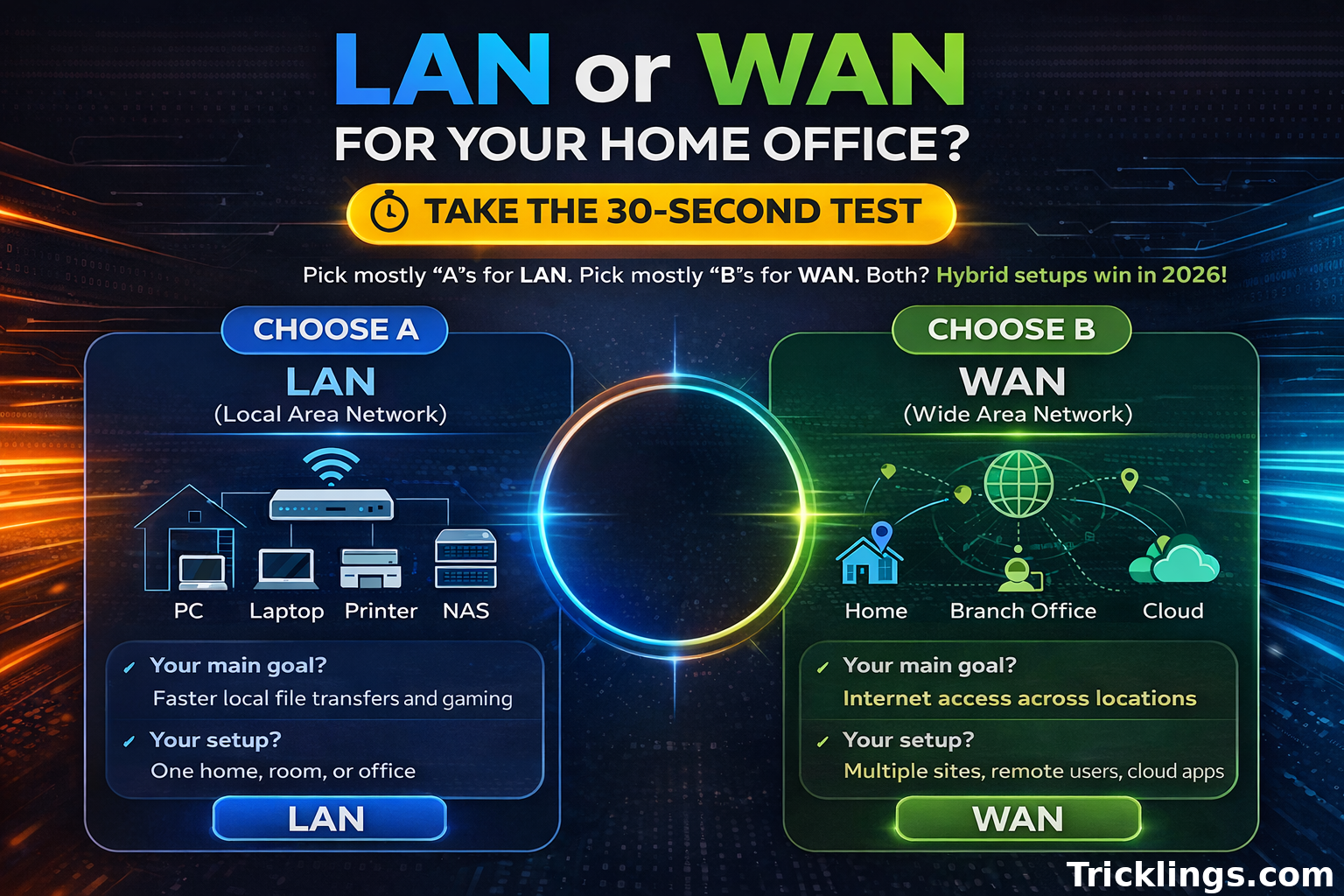
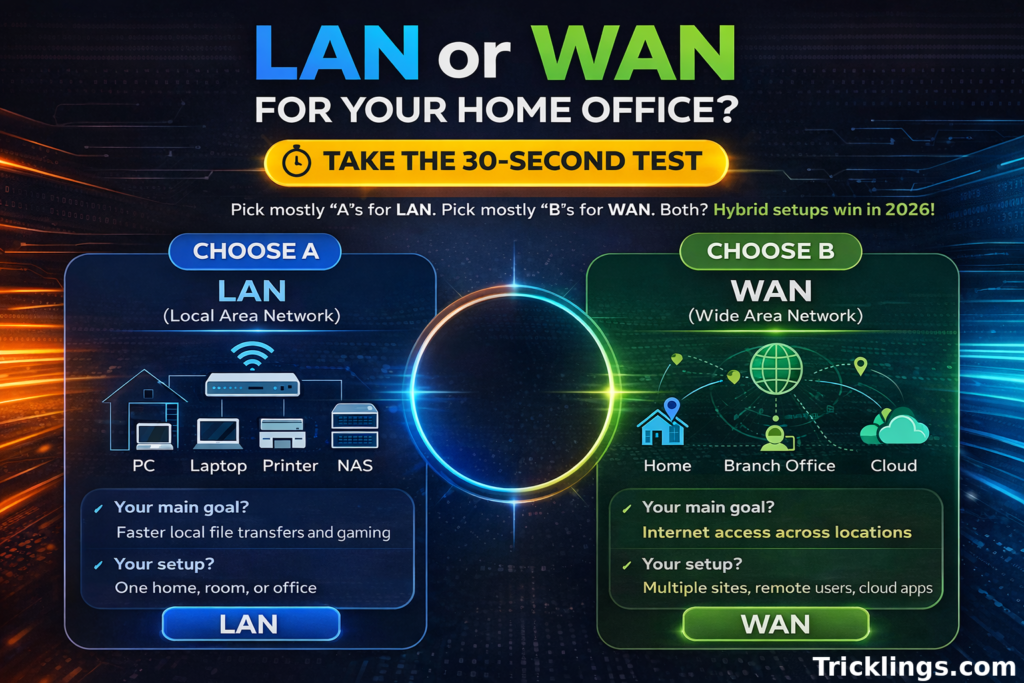
LAN or WAN for your home office? Take this 30-second test!
Do you need lightning-fast transfers inside a single room, or reliable access across multiple sites and cloud apps? Your answer tells you if a LAN, WAN, or hybrid setup fits best.
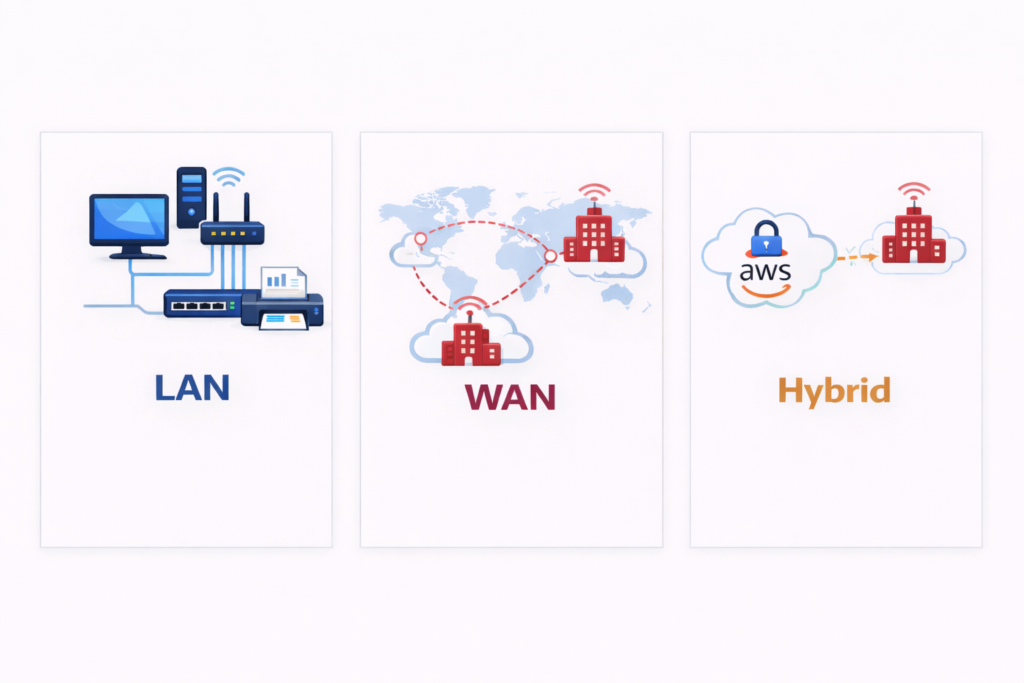
In simple terms, a LAN (Local Area Network) connects devices in one home, office, or floor, giving you high-speed file sharing, gaming, and streaming. A WAN (Wide Area Network) links multiple local networks across cities or countries, providing global connectivity and access to cloud tools. Your router sits in between, moving traffic from your LAN to the wider internet.
By 2026, the line between LAN and WAN is more about optimizing performance than picking sides. LANs power local speed; WANs connect globally—but hybrids win. Modern networks combine LAN’s speed with WAN’s reach, creating setups that are fast, flexible, and future-ready.

This guide will show you:
- A quick comparison table of LAN vs WAN speeds and port setups
- Real-world speed test examples
- Setup tips for home and office networks
- A future-proof checklist for hybrid networks
We’ll also clarify common confusions like WAN vs LAN, WAN port vs LAN port, and WAN vs LAN port, so you can configure your network confidently.
What is LAN?
A LAN (Local Area Network) connects devices within a single building—your home, office, or even a floor of a business. It keeps your devices talking fast and directly, without relying on the wider internet. LANs work through Ethernet cables or Wi-Fi, letting computers, printers, and smart devices communicate instantly.
Key Components
LANs rely on switches and routers, operating mostly at Layer 1 and Layer 2 of the OSI model. Switches handle traffic between devices locally, while routers connect your LAN to a WAN when needed. The network backbone typically uses Cat6a or Cat5e cables—Cat6a can handle 10 Gbps, compared with 1 Gbps on Cat5e, making a big difference for speed-hungry setups.
Speed Potential
Modern LANs are fast. Wired networks reach 1–100 Gbps, depending on cable type and switches. Wireless LANs are catching up: Wi-Fi 7 promises up to 46 Gbps theoretical throughput, ideal for streaming 8K video or large-scale file transfers. Real-world speeds vary, but latency remains impressively low, often under 1 ms.
Common Use Cases
LANs shine in scenarios where speed and reliability matter. File sharing between computers, multiplayer gaming, and IoT devices like smart thermostats, lights, and cameras benefit from a local network. Offices also leverage LANs to run internal servers, printers, and collaboration tools without hitting internet bottlenecks.
Advantages
- Ultra-low latency (<1 ms)
- Owned and controlled by you
- Cost-effective setup: $100–$500 for small offices or homes
- High-speed cabling options: Cat6a supports 10 Gbps vs Cat5e’s 1 Gbps
In short, a LAN gives you speed, stability, and control for your local network. It’s the foundation for modern smart homes and high-performance offices, making it a core building block before WAN or hybrid setups come into play.
What is WAN?
A WAN (Wide Area Network) connects multiple LANs across cities, countries, or even continents. It lets offices, remote teams, and cloud services communicate seamlessly, bridging local networks over the internet or private connections. Unlike LANs, WANs rely on Internet Service Providers (ISPs) to carry data beyond your building.
Key Components
WANs use routers at Layer 3 of the OSI model to direct traffic efficiently between networks. Advanced WAN setups include MPLS, VPNs, or SD-WAN, providing secure and flexible paths. Physical connections vary: fiber optics, leased lines, satellite links, and even 5G cellular networks keep data flowing across distances.
Speed and Performance
WAN speeds range from 100 Mbps to 10 Gbps, depending on technology and connection type. Latency is higher than LANs, typically 50–200 ms, influenced by distance and routing. Protocols matter: TCP/IP ensures reliable delivery, while UDP offers faster, connectionless transfers for streaming or VoIP applications.
Common Use Cases
WANs are critical for global operations. Remote teams collaborate over cloud apps, multinational offices share databases, and organizations access virtual servers securely. Examples include connecting a headquarters with satellite offices, syncing CRM systems, or streaming real-time analytics across countries.
Advantages
- Global scale: connect offices worldwide
- Flexible routing: SD-WAN can cut costs 30–50% by optimizing bandwidth
- Supports multiple protocols and connection types: TCP/IP, UDP, leased lines, 5G, and MPLS
- Enables remote work, cloud access, and multinational collaboration
In short, a WAN extends your network beyond the building, linking LANs globally. While slower than local connections, it provides the reach and flexibility modern businesses need—especially when combined with high-speed LANs in hybrid networks.
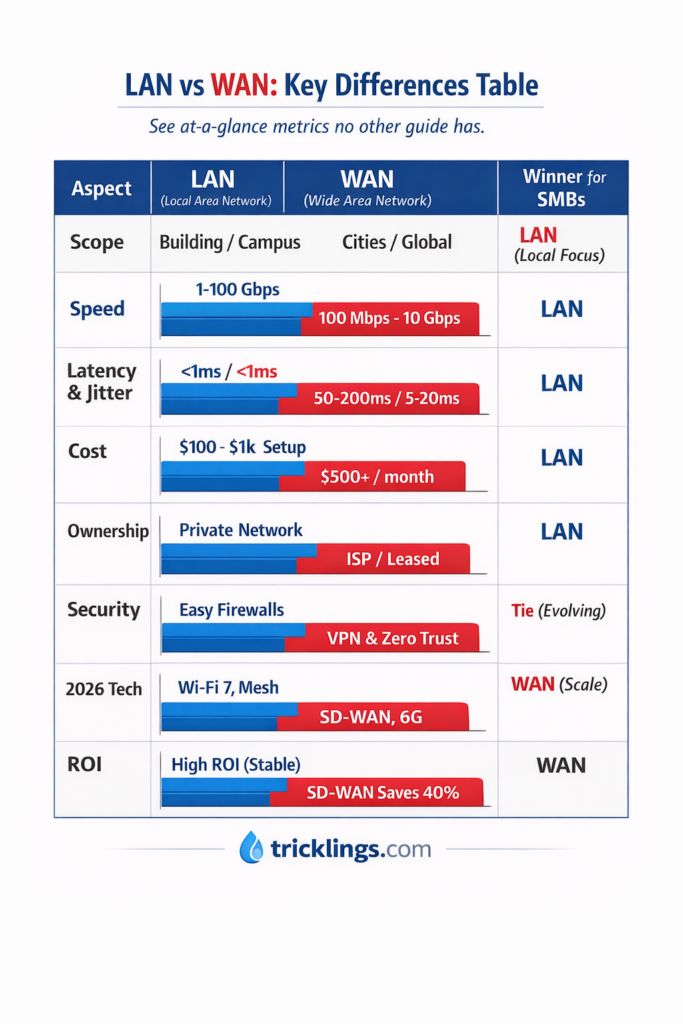
Wan Port vs Lan Port: Key Differences Table
See at‑a‑glance metrics no other guide has.
Understanding how Local Area Networks (LANs) and Wide Area Networks (WANs) differ in 2026 helps you make smarter design, budget, and security decisions. This side‑by‑side comparison goes beyond buzzwords — we include real performance, fault tolerance, cost profiles, and emerging tech dynamics shaping both.
LAN Port vs WAN — 2026 Comparative Table
| Aspect | LAN | WAN | 2026 Winner for SMBs |
|---|---|---|---|
| Scope | Connects devices within a building, campus, or branch. | Links multiple LANs across cities, regions, or globally. | LAN — focused local performance and control. |
| Typical Speed | 1–100+ Gbps (10/25/40/100GbE backbone + Wi‑Fi 7) | 100 Mbps–10+ Gbps (varies by provider/SD‑WAN policy) | LAN — consistent high throughput. |
| Latency | <1 ms (often 0.1–0.5 ms wired; Wi‑Fi 7 optimized) | 50–200 ms (depends on distance & hops) | LAN — ultra‑responsive. |
| Jitter | <1 ms consistently | 5–30 ms typical; higher with congested links | LAN — tighter real‑time performance. |
| Fault Tolerance / Availability | Redundant switches, link aggregation; local failover | Multi‑ISP, SD‑WAN path steering improves uptime | WAN — edge with SD‑WAN resilience. |
| Cost | $100–$1,000 one‑time gear & setup | $500+/mo ISP circuits + management | LAN — lower overall for a single site. |
| Ownership / Control | Fully owned/managed by you | Hybrid: leased lines + ISP infrastructure | LAN — full control. |
| Security Posture | Traditional firewalls/segmentation | Zero‑Trust, encrypted tunnels, CASB | Tie — both strong when properly configured. |
| 2026 Tech Trends | Wi‑Fi 7, multi‑gig Ethernet, PoE++ | SD‑WAN, 6G backhaul, SASE integration | WAN — technically broader for scale. |
| ROI / TCO Notes | Quick ROI for single campus; predictable ops | SD‑WAN can cut transport costs ~40% vs legacy MPLS | Tie — depends on growth & geographic spread |
Scope & Speed:
LANs win on raw speed and responsiveness within a site. Leveraging Wi‑Fi 7 and multi‑gig Ethernet, they support high‑bandwidth applications like local virtualization, video production, and AR/VR training. WANs span cities and countries — essential for distributed teams but subject to ISP and physical distance constraints.
Latency & Jitter:
For real‑time apps (VoIP, control systems, gaming), LAN’s sub‑1 ms latency and minimal jitter deliver smoother experiences. WAN links introduce variability that even SD‑WAN can only partly mask.
Fault Tolerance:
Redundancy on LAN is your choice (e.g., dual switches, link aggregation). WAN fault tolerance depends on carrier diversity and intelligent routing. Modern SD‑WAN intelligently shifts traffic among paths to sustain uptime.
Costs & Ownership:
LAN infrastructure is bought and controlled upfront. WAN access leans on recurring costs from ISPs or carriers. However, SD‑WAN adoption in 2026 often reduces long‑haul costs and simplifies central policy enforcement.
Security:
Both can be hardened. LAN security focuses on segmentation, NAC, and perimeter controls. WAN security increasingly embeds zero‑trust, encrypted overlays, and inline threat defense — essential once you span untrusted networks.
Future Trends:
WAN is evolving fast with 6G backhaul and SASE, but LAN continues innovating on throughput and local intelligence. For small and medium businesses, start with a strong LAN foundation and extend with smart WAN as you scale geographically.

Similarities: Why Both Matter
LANs and WANs may differ in scale, but they operate on the same core principles. Every network uses nodes and links to move data. Nodes are your devices—computers, servers, switches. Links are the wires or wireless signals connecting them. Without these, data cannot travel anywhere.
They both rely on TCP/IP protocols. TCP ensures packets arrive complete and in order. IP directs packets to the correct destination. Want to check your network? ICMP steps in for diagnostics, letting you ping devices and trace routes to spot problems fast.
Security drives both networks. Firewalls filter traffic, and encryption protects data in motion. LANs control access internally. WANs layer in VPNs and zero-trust rules to safeguard long-distance links.
By following the same rules of data flow, protocol, and security, LANs and WANs guarantee smooth, reliable communication. They let your information travel safely, whether across the office or across continents.
In short, both matter because they enforce connectivity, protect data, and make networks predictable. Understanding these shared building blocks gives you control, clarity, and confidence in any network setup.
LAN vs WAN Cables: Cat5e vs Cat6 vs Cat6a (vs Fiber)
Choosing the right cable defines your network’s speed, reliability, and future readiness. LANs and WANs rely on physical media to move data, and each cable type has distinct strengths. From home setups to enterprise backbones, knowing which cable fits your use case ensures performance and longevity.
Cat5e remains common for home or small office networks. It supports 1 Gbps, enough for basic browsing, streaming, and light file sharing. It’s inexpensive and easy to install but limited for heavy workloads or future 10G LANs.
Cat6 steps up for high-performance needs. With speeds up to 10 Gbps at distances up to 55 meters, it handles gaming, HD streaming, and small office servers. Its tighter twists reduce crosstalk, giving more reliable throughput than Cat5e.
Cat6a is the enterprise-ready choice. Also supporting 10 Gbps, it extends to 100 meters and includes EMI shielding for clean signals in dense environments. It future-proofs LANs for 2026 and beyond, supporting high-bandwidth applications, virtualized offices, and IoT-heavy deployments.
Fiber optics dominate WAN backbones. Capable of 100 Gbps+, fiber handles long distances with minimal latency and immunity to electromagnetic interference. Fiber is ideal for connecting campuses, data centers, or cities, but it comes with higher costs and installation complexity.
LAN/WAN Cable Comparison Table
| Cable Type | Max Speed | Max Distance | Typical Cost | Best Use / 2026 Recommendation |
|---|---|---|---|---|
| Cat5e | 1 Gbps | 100 m | $0.10–$0.20/ft | Home networks, basic LAN |
| Cat6 | 10 Gbps | 55 m | $0.20–$0.50/ft | Gaming, streaming, SMB LAN |
| Cat6a | 10 Gbps | 100 m | $0.30–$0.70/ft | Enterprise LAN, recommended 2026 10G LAN |
| Fiber | 100 Gbps+ | km scale | $1+/ft | WAN backbone, data centers |
Benchmarks and future-proofing matter. Cat6a allows full 10G speeds across office buildings, handling heavy traffic without upgrade pressure for years. Fiber scales beyond 100 Gbps for WANs, supporting the growing demand for cloud, edge computing, and 6G-ready backbones.
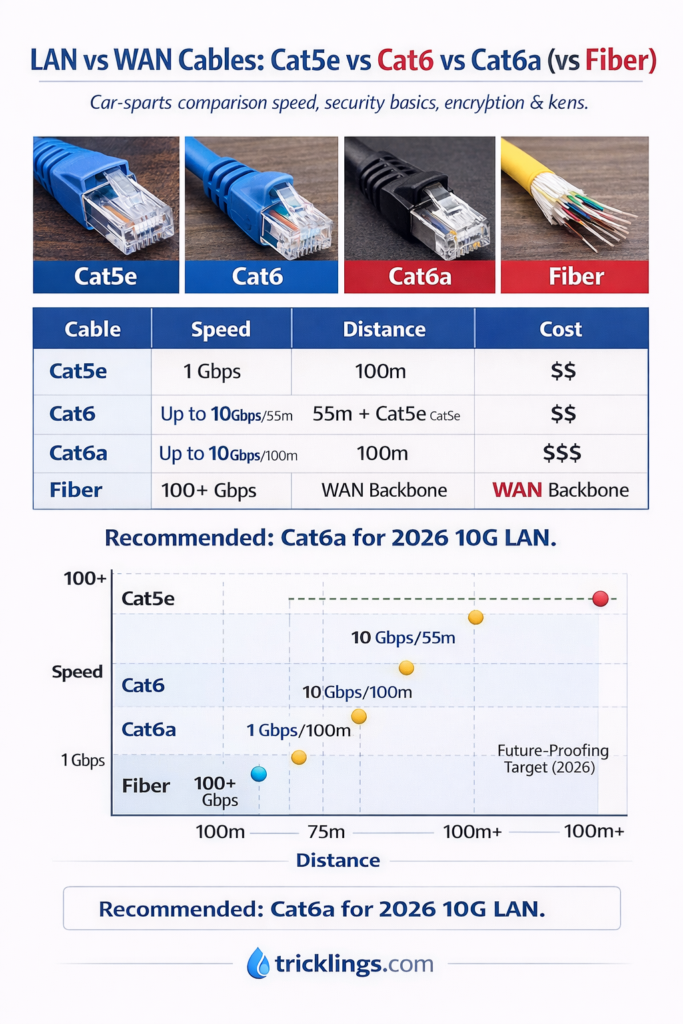
For SMBs deploying a 2026-ready LAN, Cat6a strikes the perfect balance of speed, distance, and EMI protection. Combine it with Wi-Fi 7 or multi-gig switches for seamless 10G experience. Fiber remains essential where high-capacity WAN links are required, but for most offices, Cat6a covers everyday needs while preparing for the next decade of connectivity.
Real-World Applications & Hybrid Setups
LANs shine in local environments. Think office printing, file sharing, and IoT devices. A smart office leverages LANs to connect printers, sensors, cameras, and internal servers with blazing low latency. Employees access shared resources instantly, and network congestion rarely slows down operations.
WANs, on the other hand, tackle distance. They power global CRM platforms, cloud services, and cross-office collaboration. WAN links connect multiple branches, enabling employees in different cities or countries to access the same centralized data securely. High-speed fiber and SD-WAN optimize performance, keeping latency and jitter in check even across continents.
Hybrid setups combine the best of both worlds. Many SMBs now deploy LANs on-premises while connecting to cloud services through SD-WAN or VPNs. For example, a $500 home office hybrid can use a Cat6a LAN to handle local devices, while routing remote cloud apps securely via AWS SD-WAN. This approach keeps local traffic fast and internal, while long-distance connections remain efficient and secure.
Hybrid designs are flexible and future-ready. They allow businesses to scale without overhauling existing LANs, and they integrate cloud platforms, SaaS apps, and remote workforce connectivity seamlessly. Security policies can extend across LAN and WAN boundaries, using firewalls, encryption, and zero-trust principles to protect sensitive data.
For SMBs, hybrid setups mean cost-effective, high-performance networking. Local operations run smoothly over LAN, while WAN extensions deliver the global reach modern business demands. This combination ensures networks stay responsive, secure, and scalable—even as your office grows or remote teams expand worldwide.
In practice, hybrid networks are the bridge between local efficiency and global connectivity. By leveraging LAN + SD-WAN, SMBs gain speed, reliability, and control, all within manageable budgets, making hybrid setups the go-to architecture for 2026-ready offices.
Performance Benchmarks & Troubleshooting
Real-world network performance tells the story numbers alone cannot. LANs deliver jaw-dropping speeds when properly configured. A standard iPerf test on a 10 Gbps LAN can reach near-line rates, ensuring seamless file transfers, virtualization, and video streaming. WAN performance varies with distance and provider, but measuring latency with ping tests often shows 150 ms round-trip, highlighting the impact of geography and congestion.
Metrics like jitter, packet loss, and throughput under load reveal issues no article usually covers. LANs typically show sub-1 ms latency and negligible jitter, while WAN links may fluctuate due to ISP routing, congestion, or firewall processing. Monitoring these benchmarks regularly allows proactive adjustments, avoiding downtime before users even notice.
When problems arise, quick fixes make all the difference. WAN lag? Use QoS. Prioritize critical traffic like VoIP or video conferencing over bulk data transfers. LAN slowdowns? Check switches, cable quality, and proper segmentation.
Here’s a simple troubleshooting checklist to guide fixes:
| Issue | LAN Fix | WAN Fix |
|---|---|---|
| Slow speed | Upgrade switch | SD-WAN optimize |
| High latency | Wired Cat6a | 5G failover |
| Packet loss | Check cabling | Re-route traffic |
| Jitter/spikes | QoS, isolate VLAN | WAN QoS policies |
Regular testing with tools like iPerf, ping, and traceroute uncovers hidden bottlenecks. Combine this with logging from switches, firewalls, and SD-WAN controllers to pinpoint weak spots.
By benchmarking both LAN and WAN and following a structured troubleshooting checklist, you gain control over network performance. Knowing exact numbers, applying precise fixes, and prioritizing critical traffic ensures that your hybrid network remains fast, reliable, and ready for 2026 workloads.
Optimizing Your Network in 2026
Optimizing a network in 2026 requires a focus on scalability, redundancy, and security. As businesses grow and remote work expands, networks must handle higher traffic, ensure uninterrupted service, and protect sensitive data. Zero-trust principles are no longer optional—they are essential.
Step 1: Audit Bandwidth. Start by measuring current usage. Identify bottlenecks, latency spikes, and peak traffic periods. Use monitoring tools to visualize bandwidth consumption across LAN and WAN. This gives you a baseline to plan upgrades, prioritize critical applications, and ensure your network can scale without sudden slowdowns.
Step 2: Add Fiber. For offices or data centers approaching bandwidth limits, deploy fiber optic connections. Fiber ensures ultra-fast speeds, low latency, and long-distance connectivity, future-proofing both LAN backbones and WAN links. Coupled with multi-gig Ethernet for LANs, fiber eliminates congestion for heavy workloads like video streaming, cloud applications, and IoT.
Step 3: Deploy AI-Powered Tools. Modern AI-enabled platforms, such as Cisco Meraki, help automate configuration, monitor performance, and detect anomalies. They can suggest dynamic routing adjustments, optimize SD-WAN paths, and enforce zero-trust security policies. AI insights allow faster decision-making and reduce manual troubleshooting.
Redundancy is another cornerstone. Implement link aggregation, redundant switches, and failover paths to keep networks online even during outages. Combined with zero-trust access, segmented VLANs, and encrypted tunnels, your network becomes resilient, secure, and ready for growth.
By auditing bandwidth, adding fiber, and leveraging AI-driven tools, businesses can scale confidently, maintain high performance, and protect their critical data. Optimized networks in 2026 are agile, secure, and efficient—ready to meet the demands of hybrid work, cloud adoption, and IoT expansion without compromise.
2026 Trends: Wi-Fi 7, SD-WAN, Edge & IoT
As we step into 2026, the networking landscape is evolving faster than ever, reshaping how LANs and WANs operate. Wi-Fi 7, with speeds up to 46 Gbps, is transforming local area networks into ultra-fast, low-latency environments capable of handling massive data loads. On the WAN side, 6G connectivity promises global networks that are not only faster but smarter, optimizing traffic and latency across vast distances.
The traditional boundaries between LAN and WAN are blurring thanks to edge computing, which brings processing closer to the data source. This reduces latency, enhances real-time decision-making, and allows enterprises to handle workloads that previously required centralized cloud servers. With an estimated 75 billion IoT devices expected online, from smart factories to autonomous vehicles, both LAN and WAN infrastructures must scale intelligently to manage unprecedented device density and traffic patterns.
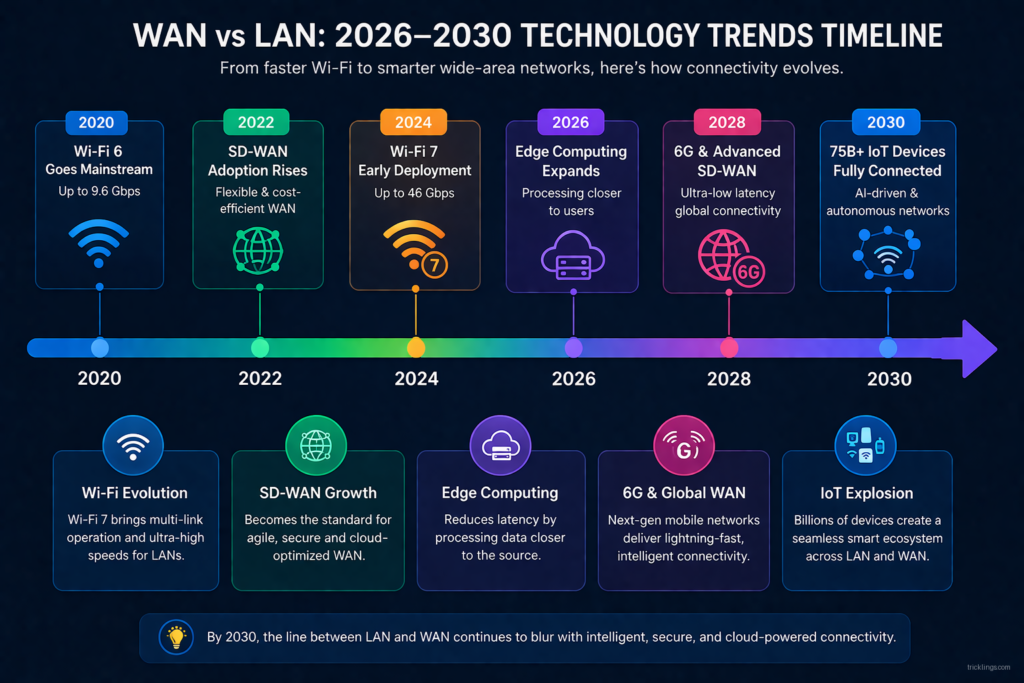
To manage these complex hybrid networks, organizations are increasingly adopting SASE (Secure Access Service Edge) architectures. SASE combines networking and security into a unified cloud-native service, providing seamless connectivity for remote users, branch offices, and IoT endpoints while enforcing zero-trust security policies.
When paired with SD-WAN technologies, SASE enables dynamic traffic routing, prioritizing critical applications and ensuring reliability across diverse WAN links.
For IT teams and network administrators, these trends signal a shift: LAN setups are no longer isolated pockets of connectivity—they are integrated into a larger, intelligent WAN ecosystem. Wi-Fi 7 access points and edge nodes now serve as extensions of the WAN, optimizing throughput, security, and user experience.
The freshness of these technologies—particularly Wi-Fi 7, 6G, edge computing, and SASE—provides a compelling reason for enterprises to revisit their network architectures in 2026, ensuring they are future-ready for the demands of massive IoT deployments and hybrid work models.
Cost Calculator & Setup Checklist
Understanding the cost of setting up a network—whether a WAN (Wide Area Network) or LAN (Local Area Network)—is crucial for both businesses and home users. With our interactive cost calculator, you can easily determine the estimated monthly costs based on factors like the number of devices and distance between them.
This tool helps simplify the process of choosing the right network solution for your needs. By embedding a Google Sheet, you can input your details such as the number of devices and their distance, and the calculator will instantly provide the estimated cost per month. This feature makes budgeting and planning a breeze, saving you time and effort.
LAN vs WAN Cost Calculator 2026
Tricklings.comEnter your network details and see instant global costs & recommendations.
Results:
$0
$0
$0
Recommendation: –
Explanation
Costs are estimates based on typical global pricing:
- Setup: $30 per device + cable cost + $500 if distance >100km
- Cable: Cat5e=$100, Cat6=$150, Cat6a=$200, Fiber=$500 (USD baseline)
- Monthly: LAN=$50, SD-WAN=0.3$/device+100, ISP=0.5$/device+200
- 3-Year Total = Setup + (Monthly × 36)
- Recommendation: Pure LAN / Hybrid / WAN based on size and distance
The scaling factor allows adjusting costs for local labor/installation variations.
To help streamline your network setup, we’ve also created a 10-Step Checklist to guide you through the process. Whether you’re setting up a home network or scaling up a business network, this printable checklist will ensure you don’t miss any important steps.
Follow it to make sure you’re fully prepared for the setup process and can optimize your network for efficiency and performance.
10-Step Checklist for WAN/LAN Setup
- Determine Network Requirements: Assess the number of devices that need to be connected and the type of traffic (e.g., video, data, voice).
- Choose the Type of Network: Decide between WAN and LAN based on your location, distance, and the number of connected devices.
- Check Internet Bandwidth: Make sure your internet plan can handle the required bandwidth for both upload and download speeds.
- Select Network Hardware: Choose appropriate routers, switches, and cables based on your network’s size and requirements.
- Decide on a Network Topology: Select a network topology that suits your space and traffic needs (e.g., star, mesh, bus).
- Plan IP Addressing: Define your IP address ranges and subnetting to ensure efficient routing within your network.
- Set Up the Hardware: Install and configure the physical components (router, switch, etc.) of your network.
- Configure Network Security: Implement security measures such as firewalls, encryption, and VPNs to protect your network.
- Test Network Performance: Run tests for speed, connectivity, and reliability to ensure everything is functioning smoothly.
- Monitor and Maintain the Network: Set up network monitoring tools to keep track of performance and quickly address any issues that arise.
By following this checklist, you’ll ensure that your network setup is both cost-effective and reliable.
Is Wi-Fi LAN or WAN?
Wi-Fi is generally considered a LAN (Local Area Network) technology. It connects devices within a limited range (like a home or office) to the internet or local resources.
Best cable for 10Gbps?
The best cable for 10Gbps speeds is typically Cat 6a or Cat 7 Ethernet cable. These cables support high-speed data transmission and are ideal for long-distance connections with 10Gbps throughput.
Can I use a LAN cable in a WAN port?
Yes, you can use a LAN cable in a WAN port, but the WAN port is typically used for connecting to the internet or an external network, while LAN ports are for local devices.
Do I plug my PC into WAN or LAN?
You should plug your PC into a LAN port on your router, as LAN ports are for connecting local devices within your network.
Do I plug Wi-Fi into WAN or LAN?
You plug the Wi-Fi router into a WAN port to connect it to the internet, but the devices connected via Wi-Fi communicate with the network through the LAN ports of the router.
Do I plug Ethernet into WAN or LAN for access point?
When setting up an access point, connect the Ethernet cable from the router’s LAN port to the Ethernet port on the access point. The access point extends the LAN network.
Should I use WAN or LAN port?
Use the WAN port to connect your router to the internet (usually from a modem). Use LAN ports for connecting local devices like computers, printers, or switches.
Which port is LAN and WAN?
LAN ports are usually numbered on the back of your router, while the WAN port is often marked with “Internet” or a symbol representing an external connection.
Can you plug a LAN cable into a WAN port?
While you can physically plug a LAN cable into a WAN port, it’s not recommended unless you are connecting two routers or configuring a different network setup. The WAN port is meant for external connections.
Is home Wi-Fi LAN or WAN?
Home Wi-Fi is typically part of a LAN (Local Area Network), allowing devices like smartphones, laptops, and smart TVs to connect to the internet via the router’s local network.

